
New Feature: Gadgets

  • Subscribe to our RSS feed.
  • Twitter
  • StumbleUpon
  • Reddit
  • Facebook
  • Digg

Wednesday, 8 June 2011

Customize Your Favicon

Posted on 14:24 by Unknown

Posted by Dongil Seo, Software Engineer


For many bloggers, having a custom favicon (the tiny image displayed in your browser’s window or tab) is the finishing touch that ties together the design and identity of a great looking blog. Today, we're pleased to announce that Blogger in Draft users can now add a customized favicon to their blog.

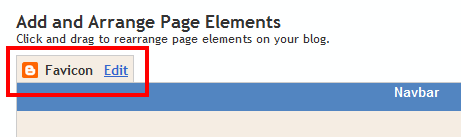
You can add a custom favicon from the Design | Page Elements tab (or, from the Layout tab if you're using the new user interface), by clicking Edit on the new “Favicon” setting above the navbar element:


A new window will then open where you can select an image from your hard drive to replace the default favicon image. This initial launch only supports .ico files, but you can easily convert your JPEG, PNG, or other non-ico image file using your own image software. There are also many conversion tools online, and a quick Google Search brings up a handful of options such as http://www.icoconverter.com/.
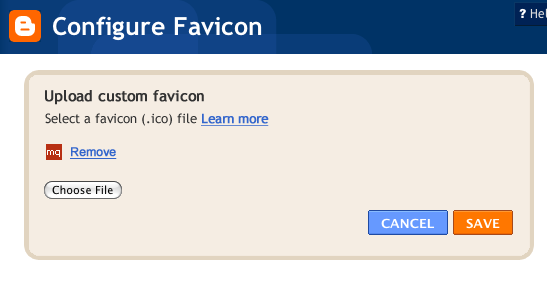


Once you’ve selected the .ico file for your favicon, click Save. We'll automatically resize the image to the correct dimensions, and you’ll then see the Page Elements updated with your selected favicon image:
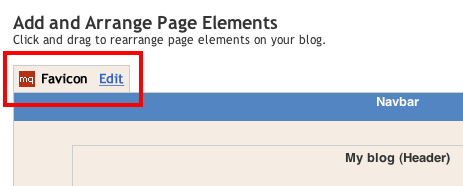


When you save your template changes, you’ll see your newly-added favicon image displayed in your browser window or tab. That’s it!

In the future, we’ll add support for more non-ico image formats, so stay tuned. In the meantime, please leave us a comment below and let us know what you think.
Read More
Posted in favicon | No comments
Newer Posts Older Posts Home
Subscribe to: Posts (Atom)
http://newfeaturegadgets.blogspot.com/

Popular Posts

  • New Feature: New Dashboard
    Our old dashboard was getting a little cramped, so we reorganized things and gave everything a fresh, new look. You can see this now by logg...
  • New Feature: Posting Gadget for iGoogle
    Today we’re launching a draft version of the Blogger Posting Gadget for iGoogle . With this gadget, you can write, save, and publish posts ...
  • The Blogger In Draft Blog Is Being Retired
    In 2007, we introduced Blogger In Draft , a special version of Blogger where new features could reach users early and let people try new thi...
  • Pages come to Blogger In Draft
    by Sean McCullough, Software Engineer Update (1/21 @ 8:54am PST): We've temporarily disabled creating & editing pages. You can still...
  • What is Blogger in draft?
    Blogger in draft is a special version of Blogger where we try out new features before releasing them to everyone. Think of it as our sandbo...
  • Blogger in Draft Bug Fixes for May 9th
    We’ve made a handful of fixes to improve Blog List : A “See All” link when you’ve truncated the list Icon loading is deferred for better pag...
  • Introducing Google Scribe in Blogger
    Posted by Kuntal Loya, Software Engineer Hello Bloggers! Do you ever find yourself writing slowly, staring at a blinking cursor or looking f...

Categories

  • about
  • blog background image
  • blog list
  • Blogger
  • Blogger in Draft
  • captions
  • contact picker
  • dictionary
  • embedded comment form
  • enclosures
  • faq
  • favicon
  • feed subscription
  • fonts
  • geotagging
  • google gadgets
  • google+
  • homepage
  • image
  • import export
  • jump break
  • mobile
  • new dashboard
  • new post editor
  • openid
  • pages
  • Panoramio
  • polls
  • post summaries
  • posting gadget
  • Preview
  • reactions
  • read more
  • redesign
  • scheduled posts
  • searchbox
  • star ratings
  • stats
  • template designer
  • video upload
  • webmaster tools
  • Widget API
  • Youtube

Blog Archive

  • ►  2012 (1)
    • ►  May (1)
  • ▼  2011 (6)
    • ►  November (1)
    • ►  October (1)
    • ►  August (1)
    • ►  July (1)
    • ▼  June (1)
      • Customize Your Favicon
    • ►  April (1)
  • ►  2010 (14)
    • ►  December (2)
    • ►  November (1)
    • ►  August (1)
    • ►  July (2)
    • ►  May (2)
    • ►  April (2)
    • ►  March (2)
    • ►  February (1)
    • ►  January (1)
  • ►  2009 (8)
    • ►  November (3)
    • ►  September (1)
    • ►  July (1)
    • ►  June (1)
    • ►  March (1)
    • ►  February (1)
  • ►  2008 (25)
    • ►  December (1)
    • ►  November (2)
    • ►  September (1)
    • ►  August (2)
    • ►  July (2)
    • ►  June (9)
    • ►  May (1)
    • ►  April (2)
    • ►  February (3)
    • ►  January (2)
  • ►  2007 (14)
    • ►  December (2)
    • ►  November (1)
    • ►  October (1)
    • ►  July (2)
    • ►  June (8)
Powered by Blogger.

About Me

Unknown
View my complete profile